How to unlock Bitlocker encrypted drive without password and recovery key?
I have problem in my pen drive that i put bitlocker key in my pen drive and now i forgot the password and recovery key so is there any chance to open the pen drive again?
As far as we know, the password and recovery key are two ways to unlock Bitlocker encrypted drive, so Bitlocker encrypted drive cannot be unlocked without password and recovery key, but there are three Bitlocker password brute-force cracking tools which can recover lost Bitlocker password by running a attack:
Solution 1: Recover Bitlocker password with Passware Password Recovery Kit
Passware Password Reocvery Kit recovers all kinds of lost or forgotten passwords for the office application files, including Excel, Word, Windows 2003, XP, 2K, or NT, RAR, WinZip, Access, Outlook, Bitlocker, TrueCrypt, PGP, etc.
Solution 2: Recover Bitlocker password with Elcomsoft Forensic Disk Decryptor
Elcomsoft Forensic Disk Decryptor offers forensic specialists an easy way to obtain complete real-time access to information stored in popular crypto containers. Supporting desktop and portable versions of BitLocker, PGP and TrueCrypt protection, the tool can decrypt all files and folders stored in crypto containers or mount encrypted volumes as new drive letters for instant, real-time access.
Solution 3: Recover Bitlocker password with Thegrideon Bitlocker Password
Thegrideon Bitlocker Password is an advanced password recovery tool for encrypted BitLocker and BitLocker to Go volumes protected with a password. Several attacks can be queued: dictionary based, brute-force, mixed (combinations of independent dictionary, brute-force and fixed parts) for precise search range setup and fastest recovery. Highly optimized code (SSE2, AVX, AVX2) and GPU (AMD, NVIDIA, Intel) utilization.
How to unlock Bitlocker encrypted drive after Bitlocker doesn't accept the password and recovery key?
If you have the correct password or 48-digit recovery key, please download and try a Bitlocker data recovery software called M3 Bitlocker Recovery to recover data from Bitlocker encrypted drive.
M3 Bitlocker Recovery is a professional Bitlocker data recovery software which can recover deleted files from Bitlocker encrypted drive, recover data from formatted Bitlocker encrypted drive, recover data from deleted/lost Bitlocker encrypted partition, recover data from damaged, inaccessible or corrupted Bitlocker encrypted drive, recover data after Bitlocker drive encryption/decryption failed, etc. after providing the password or recovery key.
Step 1: Download, install and launch M3 Bitlocker Recovery software on a Windows computer.
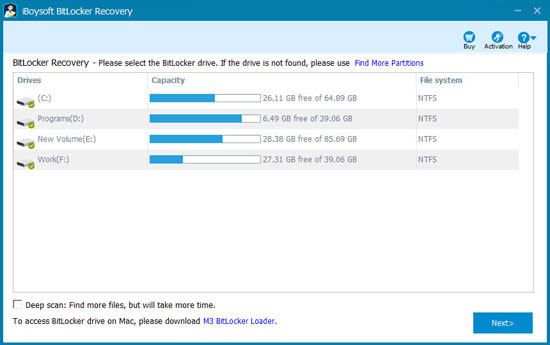
Step 2: Select the Bitlocker encrypted drive and click Next to continue.
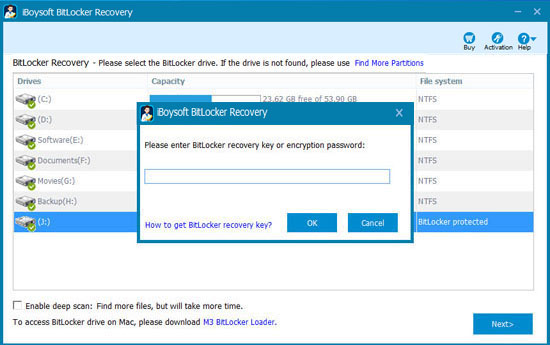
Step 3: Enter the password or 48-digit recovery key and click Ok to decrypt data from Bitlocker encrypted drive.
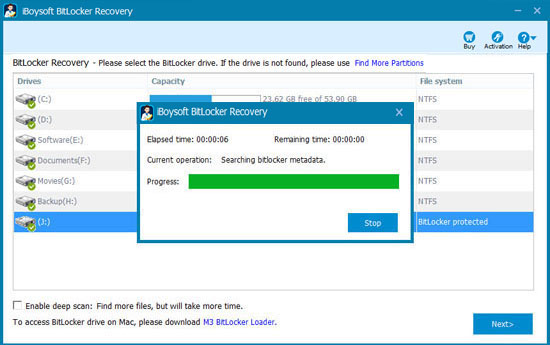
Step 4: M3 Bitlocker Recovery is scanning and decrypting the files from Bitlocker encrypted drive.
Step 5: After all your files are found, please select and click "Recover" to start data recovery process.
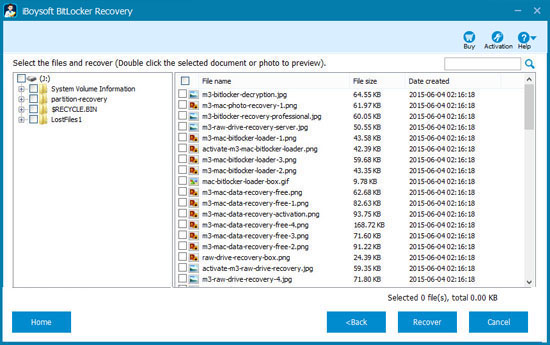
If there are some recovered files which cannot be opened, please check "Enable brute-force decryption" option and try again.
After ensuring all recovered files can be opened, please use the following method to format the corrupted Bitlocker encrypted drive and then it will be used again.
How to format Bitlocker encrypted drive without password and recovery key?
If there is no important data, you can directly format Bitlocker encrypted drive without password and recovery key using the following method:
Step 1: Right click Bitlocker encrypted drive in My Computer (This PC) or Disk Management.
Step 2: Select "Format...".
Step 3: Select file system type and allocation unit size.
Step 4: Set volume label.
Step 5: Click "Start" to format Bitlocker encrypted drive.
If there is important data, but you don't have the password or recovery key, please use the above methods to unlock Bitlocker encrypted drive without password or recovery key, back up important data and then format Bitlocker encrypted drive.
FAQ about unlocking Bitlocker encrypted drive
Following are several FAQs about unlocking Bitlocker encrypted drive:
Q: How to unlock Bitlocker drive?
A: The password and recovery key are two ways to unlock Bitlocker encrypted drive. If you don't have them, please refer to how to unlock Bitlocker encrypted drive without password and recovery key.
Q: How to unlock Bitlocker drive from command prompt with password?
A: Type the command: manage-bde -unlock X: -password (Replace X with the drive letter of your Bitlocker encrypted drive) and then enter the password.
Q: How to unlock Bitlocker drive from command prompt without password?
A: Type the command: manage-bde -unlock X: -RecoveryPassword (Replace X with the drive letter of your Bitlocker encrypted drive) and then enter recovery key.
Q: How to unlock Bitlocker drive from command prompt with recovery key?
A: Type the command: manage-bde -unlock X: -RecoveryPassword (Replace X with the drive letter of your Bitlocker encrypted drive) and then enter recovery key.
Q: How to unlock Bitlocker drive from command prompt without recovery key?
A: Type the command: manage-bde -unlock X: -password (Replace X with the drive letter of your Bitlocker encrypted drive) and then enter the password.
Q: How to unlock Bitlocker drive from command prompt without recovery key and password?
A: In this situation, there is no way to unlock Bitlocker encrypted drive from command prompt.
Q: How to break Bitlocker password using cmd without recovery key?
A: If you don't have the password or recovery key, please refer to the above solution about how to unlock Bitlocker encrypted drive without password and recovery key.
Q: How to get Bitlocker recovery key from cmd?
A: Firstly, please unlock Bitlocker drive with the password, then type the command: manage-bde -protectors X: -get (X is drive letter of Bitlocker encrypted drive) in cmd to get Bitlocker recovery key.
Q: Bitlocker recovery key is not working when unlocking Bitlocker encrypted drive?
A: If the password is not working either, please try M3 Bitlocker Recovery to recover data from Bitlocker encrypted drive.
Q: I mistakenly formatted Bitlocker encrypted drive without password and recovery key, is there a way to recover data?
A: No.
Q: I cannot access Bitlocker encrypted drive without password and recovery key, is there a way to recover data after formatting Bitlocker encrypted drive?
A: No, please don't format it and refer to how to unlock Bitlocker encrypted drive without password and recovery key.
Q: Is there a Bitlocker recovery key generator free download?
A: No, every Bitlocker encrypted drive has its unique Bitlocker recovery key.

No comments:
Post a Comment